More than 650 million people use Google Gemini every month for routine tasks, from getting queries answered to creating images and planning trips. These interactions often involve sharing context from your personal or professional life, which makes it important to understand the ins and outs of the Google Gemini privacy policy.
In practice, Gemini’s privacy policy can be complicated to interpret, especially if you’re looking for straightforward explanations of how data flows through Google’s systems. This guide breaks down the policy, covering what data Gemini collects, how Google uses it, how long it’s kept, and what privacy controls you actually have.
Google Gemini and Its Privacy Setup
Google Gemini is the conversational AI assistant at the core of Google's AI ecosystem. You can access it via its website, through the Android and iOS mobile app, or within other Google products for a wide range of tasks, including:
- Brainstorming ideas and concepts
- Generating images
- Summarizing texts
- Drafting anything from professional documents to travel itineraries
This convenience comes with specific data considerations. Most Gemini usage happens when you’re signed into Google, which means your Gemini activity can be linked to your Google account settings and identifiers. On mobile devices, Gemini may also process additional information depending on the device permissions, including screenshots, photos, voice commands, or other usage data.
Because Gemini is deeply integrated into Google’s services, its data handling is governed by Google's overarching privacy policy and terms, although the data access can depend on your account and app-level settings.
Google Gemini Privacy Policy Summary: What Data Can It Collect?
According to the Google Gemini privacy policy, data collection falls into two broad buckets: information you provide directly and information collected automatically when you use Gemini apps.
Any information you share in prompts, through voice commands, or by uploading (files, photos, and on-screen content) falls into the first bucket and is collected by default.
Besides direct inputs, Gemini can collect the following data as you use the service:
Category | Types of Data Collected |
Interaction records | Transcripts or recordings from Gemini Live sessions, feedback, Gemini Gem names, custom instructions, and saved instructions |
Generated content | Outputs generated (text, code, images, videos, links, etc.) |
Payment information | Billing and subscription details for paid users |
Connected service data | Data from linked Google services (e.g., Search or YouTube history) when used with Gemini |
Device identifiers, OS, browser type, app settings, crash reports, and performance metrics | |
Mobile data | Contacts, call/message logs, installed apps, language settings, screen content (when using overlay to ask questions) |
Browser and web data | Cookies, authentication data, screen captures, and page content |
General location, IP address, device signals, or account address |
Takeaway for app users: Gemini doesn’t just see what you type or share. It can also access more private details from your phone, including your call logs, installed apps, and device usage patterns. When you use the Ask Gemini overlay, the app stores whatever’s on your screen, often revealing more than what you may intend to.
Gemini AI Data Usage Policy: How Google Uses Your Personal Information
Per Gemini AI’s data usage policy, all collected data is handled under Google’s general privacy framework and can be used for specific purposes outlined by the company.
Here’s how Google typically uses your data:
- Providing, developing, and maintaining its services: Your Gemini insights, along with other account details, are used to deliver its services and design future products and AI features. Interaction logs and crash reports help Google fix errors, prevent outages, and enhance features for all users.
- Personalization: Data from your connected Google apps (like Gmail or Calendar) may help tailor Gemini's answers. Some of this data may be used to personalize content and ads across Google services, based on your settings. However, your Gemini chats aren’t used to deliver personalized content or ads.
- Safety and security: Automated systems routinely analyze usage data to detect potential spam, malware, and illegal activity within the platform.
- Communication: Your contact information may be used to send you important security alerts and service updates.
Your Gemini data may also be reviewed by human reviewers to support service improvement and quality control, which is why the policy advises against entering confidential or highly sensitive information via inputs.
For many privacy-aware users, a deeper concern is how Gemini fits into Google’s broader data practices. The company has repeatedly faced legal scrutiny over pervasive data collection and ad-related tracking.
A recent case was in 2025 when Google was fined ~$314 million for illegally collecting cellular data on Android devices. Such incidents highlight a systemic issue with its business model and privacy policy, as well as inconsistent transparency and user consent layers.
Is Gemini Data Used for AI Model Training?
On standard, consumer-facing Gemini plans, user data can be used for model training unless you opt out. Gemini AI's privacy policy explicitly mentions that Google “may use anonymized Personal Information to train AI models for internal use only.”
To stop your future conversations from being used in AI training, you need to disable the Gemini Apps Activity. Here’s how:
On mobile |
|
On a browser |
|
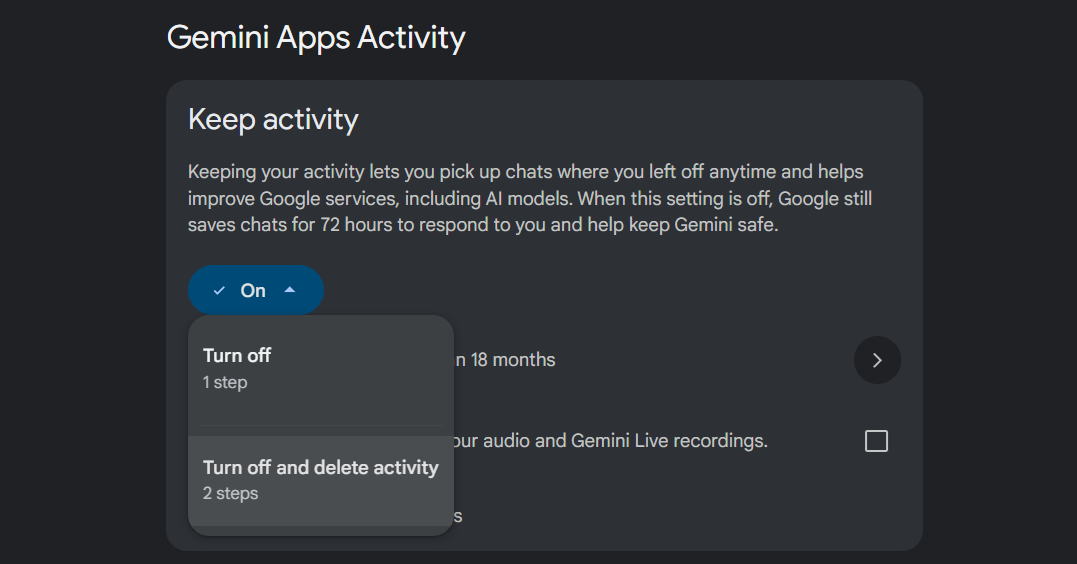
Source: Google Gemini
Alternatively, you can use Gemini’s Temporary Chat feature, which creates conversations that disappear after 72 hours and aren’t used for AI training by default. You can start a Temporary Chat by clicking the dotted chatbox icon next to the New Chat button.
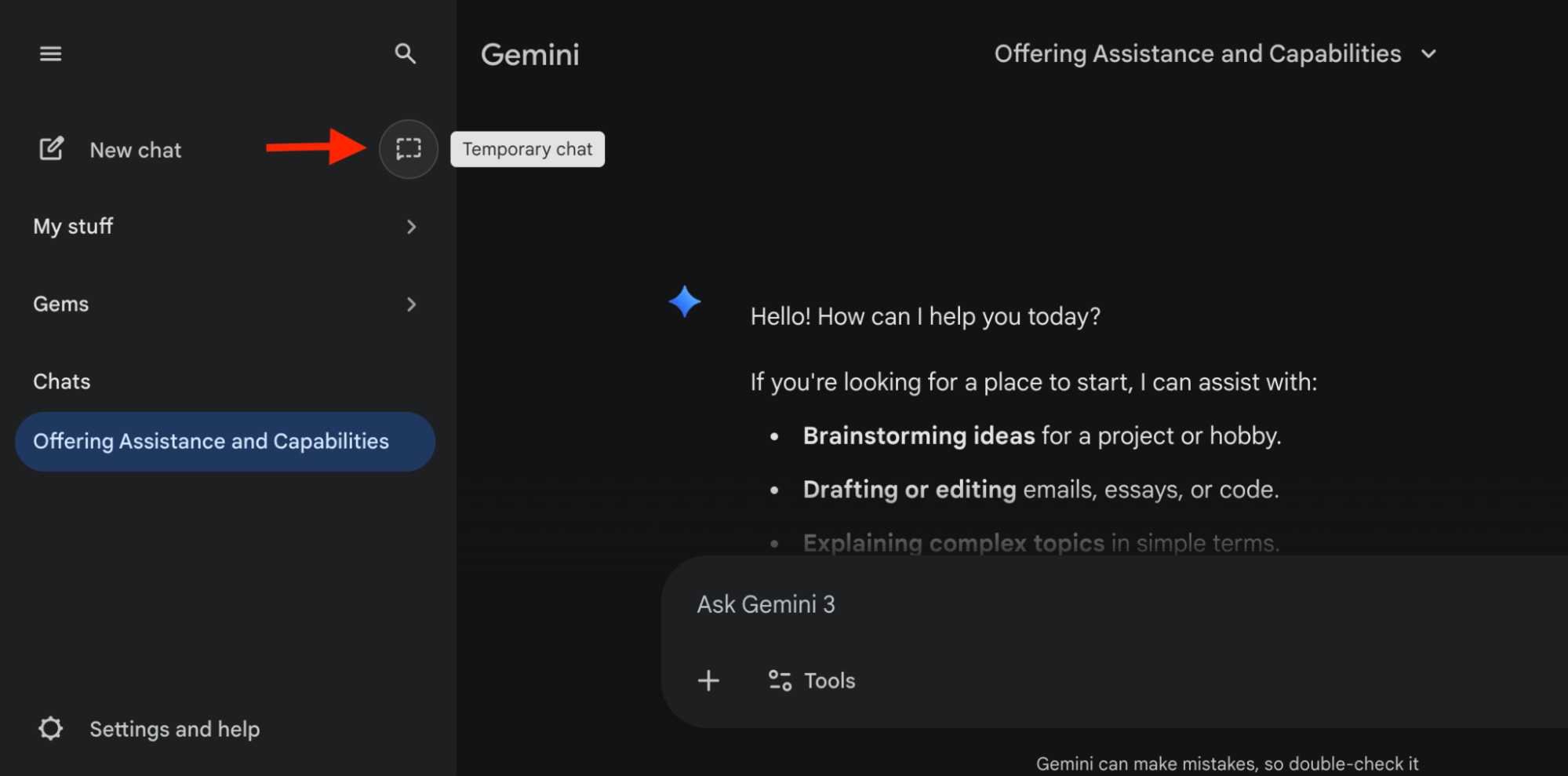
Source: Google Gemini
For users of Google Workspace (Business/Enterprise), Google Cloud, or API (paid quota), your data is handled under the Gemini API privacy policy and data processing agreement (DPA) terms. Google commits to not using enterprise customer data for training AI models without prior permission.
Bonus: Read our privacy policy guides for other AI providers:
Does Google Share Your Gemini Data With Third Parties?
Yes, Google may share your data with external companies or organizations, but only under specific conditions outlined in its policy. Here are the entities listed that can access your personal information:
- Service providers and affiliates: Google may share data with trusted third-party companies for essential functions like payment processing, data storage, fraud prevention, and customer support. Data sharing is limited to the underlying services and is subject to confidentiality requirements.
- Legal and government bodies: Google may disclose data to authorities to comply with lawful requests.
- Advertising and analytics partners: Some information may be shared with partners that help measure service performance and, based on your ad settings, offer personalized advertising.
- Trusted business partners: Your information may be shared in situations like audits, mergers, acquisitions, or similar corporate transactions.
How Long Does Google Retain Gemini Data?
Google retains Gemini data for different periods based on your account type, settings, and the specific interaction. For consumer Gemini users (Gemini app or website), the following retention timelines apply:
Data | Retention Period |
Gemini chats (Gemini Apps Activity enabled) |
|
Gemini chats (Gemini Apps Activity disabled) | 72 hours |
Temporary Chats | 72 hours |
Data reviewed by humans | Up to 3 years, even if you delete the chat |
Conversely, the Google Gemini data retention policy for enterprise and cloud services depends on contractual terms, service agreements, and admin-controlled settings. Retention periods can also vary based on the specific product, subscription, and organization-level policies.
Across all cases, Google may retain certain information longer when required for security, fraud prevention, legal compliance, or dispute resolution, even if user-facing activity is deleted.
What Controls Do You Have Over Your Gemini Data?
Besides adjusting Gemini Apps Activity and using Temporary Chats, you have a few other ways to limit how Gemini data is connected, stored, or reused.
For example, on mobile, you can limit Gemini app permissions. If you use an Android device, you can go to Settings>Apps>Gemini>Permissions and remove any permission (contacts, call logs, microphone) you don’t want Gemini to access. On iOS, you can adjust similar permissions in Settings>Privacy & Security.
Gemini can also integrate with other services, such as Gmail, Google Drive, and productivity tools, to fulfill requests—e.g., summarizing messages or scheduling events. You can disconnect the apps to stop any access to data you’re not comfortable with. In the Gemini settings, look for Connected Apps to disable services as per your preferences.
On newer Android models, Gemini might be tightly integrated into the Google ecosystem and cannot be fully removed without affecting system functionality. For users who want to reduce this interdependency, switching to privacy-focused Android alternatives like GrapheneOS can be a decent option.
Limitations of Gemini’s Privacy Controls
Depending on your privacy settings, Gemini can access significant user activity, including third-party app usage and screen content. And, no matter how carefully you configure its privacy controls, there’s a limit to what app-level settings can protect.
If you frequently use Gemini on your phone, you should also consider network-level threats from your mobile carrier. Gemini requests on a phone may pass through your mobile network, which is another major, often overlooked, source of data collection.
Most mobile carriers track your account identifiers, data volume, location, and the services your device connects to. This information is used to create digital user profiles, occasionally sold to third-party advertisers, and frequently exposed to breaches that could lead to identity theft or financial fraud.
We’ve seen this happen in practice. The biggest U.S. carriers, including AT&T, Verizon, and T-Mobile, have been complicit in collecting, storing, and often illegally selling your data to third parties.
Beyond commercial misconduct, all three were among at least nine U.S. carriers compromised by the Salt Typhoon campaign, a Chinese state-sponsored intrusion disclosed in late 2024 and still unfolding through 2026, with the FBI confirming that more than 200 organizations across 80 countries were affected.
To close this gap, switch to the Cape network, built on privacy-first principles from the ground up. Cape operates without requiring your personal information, tracking your app usage, or selling your data, effectively minimizing data exposure at the carrier level.
Cape Makes Security the Standard: Here’s How
Cape is America’s privacy-first mobile carrier, providing premium, unlimited, and nationwide call, text, and data. Unlike other providers, our service is built from the ground up with privacy and security at its core.
Mainstream carriers track you and store your data, often without your consent. Cape takes a different path—we collect the absolute minimum amount of information to provide you with service.
Any information we do collect is retained for the minimum amount of time possible. Most carriers store call data records (CDRs) for years, sometimes indefinitely. Cape stores yours for just 24 hours, and we have a commitment to never sell your data.
Cape service includes security features that no other carrier offers:
- Minimal Data Collection: During onboarding, we don’t ask for your name, Social Security number, or address. We only collect what’s necessary to provide you with service, and we retain it for the minimum amount of time possible.
- Identifier Rotation: Every SIM card has an International Mobile Subscriber ID (IMSI), a unique identifier which your device uses to register with cellular networks. Most carriers assign a fixed IMSI that stays the same for the life of your account, making it easy for your carrier, advertisers, and bad actors to identify and track your device over time. Cape breaks that pattern by allowing subscribers to automatically rotate their IMSI every 24 hours, so you appear as a different subscriber every day, making it much more difficult for anyone to follow or track your movements.
- Secondary Numbers: Your phone number is a target for data brokers and scammers. Retailers, websites, apps—everyone is routinely asking you to share your number with them, which exposes you to a variety of risks. Many turn to VoIP numbers to use as secondary lines, which can be helpful, but cost extra, don’t work with 2FA, and aren’t encrypted. Cape provides subscribers with two free additional SMS/MMS lines that are middle-to-end encrypted. With secondary numbers, you can reserve your primary number for communicating with your close friends and family, and use the other for anything from shopping and signing up for discounts, to receiving secure OTPs.
- Disappearing Call Logs: Call and text records reveal a lot about you, from who your closest relationships are to when and where communication took place. With traditional carriers, your call and text metadata doesn’t just disappear; it’s retained, analyzed, and folded into a lasting customer profile. At Cape, we’re built to forget and delete these records after just one day.
- SIM Swap Protection: A SIM swap happens when an attacker convinces your carrier to transfer your number to their device, allowing them to receive your calls and texts, trigger password resets, and gain access to your accounts. Cape protects against SIM swaps by removing humans entirely from the loop. During sign-up, you receive a 24-word phrase that generates a private key tied to your number. This phrase is the only way to move your number to a new device or carrier. No one, not even Cape, can transfer your number without your phrase, giving you full control over your number.
- Network Lock: Traditional cellular networks were designed for interoperability, not security. Outdated and legacy network protocols like SS7 have vulnerabilities that allow attackers to hack in and track your location, intercept your calls and texts, and steal sensitive information. Cape’s Network Lock uses a proprietary signaling proxy to verify that your device’s physical location matches the network it’s trying to attach to. If anything looks suspicious, like a mismatched location, we block the connection.
- Encrypted Voicemail: Voicemails can reveal more than you think, from personal messages to authentication codes, yet most voicemail systems are outdated and unencrypted. Cape encrypts your voicemails so that only you can access them.
- Secure Global Roaming: While you’re traveling abroad, your phone connects to local telecom providers to provide you with connectivity. But not all networks are secure, and not all governments treat privacy the same. Cape routes your traffic through our U.S.-based mobile core. Our Secure Global Roaming gives you the convenience of international data roaming without exposing your identity or communications. You get up to 15GB per month of international roaming included in your plan.
These features are made possible because we’re a “Heavy” Mobile Virtual Network Operator (MVNO).
Other MVNOs (such as Mint Mobile, Cricket, etc.) simply ride on top of the mobile core, SIMs, and physical infrastructure of their underlying MNO partner. At Cape, we actually own our own mobile core and provision our own SIMs.
This gives us control over how accounts are authenticated, what data we do and don’t collect, how long we retain it for, as well as the ability to build proprietary features like Identifier Rotation. No other carrier on the market has this capability.
Reclaim Your Privacy: Switch to Cape Today
Ready to ditch traditional telcos and switch to a privacy-first mobile carrier? Visit cape.co/get-cape to sign up.
Thanks to our partnership with Proton, you can also take your privacy a step further and get Proton Unlimited or Proton VPN Plus for only $1 for the first six months.
Disclaimer: Google Gemini privacy policy details can change over time. Please visit https://support.google.com/gemini/ for the latest information.
FAQs
If I turn off Gemini Apps Activity, does Google stop collecting data about me entirely?
Are my Gemini prompts visible to other apps on my Android phone?
Can I delete data Google has already used to train Gemini models?
Share it
