
Mobile devices face an increasing range of threats, from malware and phishing attacks to identity theft and exposure on the dark web. In response, more carriers are bundling integrated security tools directly into their service offerings.
Verizon Digital Secure is one such solution, marketed as a security bundle that combines a VPN, anti-malware software, safe browsing features, and identity restoration services. But as with most carrier-provided add-ons, the key question is how effective they actually are in practice.
Our Verizon Digital Secure review breaks down what it really offers, where its protections fall short, and whether it's enough to keep you safe. We'll also provide tips on how to address gaps that carrier security tools leave wide open.
What Is Verizon Digital Secure?
Verizon Digital Secure is a subscription-based add-on advertised as a comprehensive solution to safeguard your device and online activity from common digital threats like:
- Unsafe websites
- Malware
- Phishing links
- Unsecured Wi-Fi connections
- Identity exposure on the dark web
Verizon markets it as a cost-effective alternative to purchasing dedicated VPN, antivirus, and identity-monitoring solutions separately. But in practice, it’s just one piece of a broader set of services Verizon sells to its customers.
Key protections, like spam call filtering or device protection, are sold separately through products like Call Filter or Mobile Protect, each with its own monthly fee. For actual comprehensive protection, you might be looking at multiple subscriptions and a significantly higher monthly bill.
Notably, this model of upselling and tiered upgrades is common across most traditional carriers. That trade-off becomes clearer when you compare it to privacy-first carriers like Cape.
With Cape, there are no add-ons, hidden fees, or a menu of upsells. You get all the protection built into a single plan, including:
- Minimal data collection, so there’s less sensitive information to expose or sell
- Identifier (IMSI) rotation, which makes it significantly harder to track your device
- Automatic deletion of call data records within 24 hours, reducing long-term exposure
Verizon Digital Secure Review: 7 Key Considerations
We’ll evaluate Verizon Digital Secure across seven fundamental aspects to assess what it claims to offer and how those claims hold up.
- Anti-malware protection
- VPN and Wi-Fi security
- Safe browsing
- Identity protection and restoration
- Pricing
- Privacy and data handling
- User reviews
1. Anti-Malware Protection
Digital Secure includes anti-malware protection designed to scan apps, downloads, and system files for known viruses and malicious signatures. However, its effectiveness is limited by both platform restrictions and scope.
For example, anti-malware protection is not available on iPhones or iPads due to Apple's security restrictions. For iOS users, the feature is reduced to a basic system scan that checks for outdated software but doesn't perform antivirus functions.
Even on supported devices, this type of scanning typically relies on known threat signatures, which means it may miss newer or more sophisticated attacks.
2. VPN and Wi-Fi Security
Digital Secure includes a Secure VPN designed to make it harder for bad actors to intercept your traffic by obscuring your IP and encrypting your data.
You can also enable Auto-scan Wi-Fi, which monitors the encryption status and safety of nearby Wi-Fi networks before you connect. If it detects a weak or unsecured network, the app will warn you, although it doesn’t actually prevent the connection.
The feature may reduce the risk of connecting to unsafe networks, but since the app doesn’t actually block unsafe connections, you could still connect to a risky network, leaving you exposed even with the feature enabled.
3. Safe Browsing
Digital Secure includes safe browsing features for both iOS and Android devices. When you click a link (whether from an SMS message, email, or search result), it is evaluated against a list of threat databases. If a phishing or malware-hosting site is detected, the feature interrupts the connection and displays an alert before the page loads, helping you avoid scams.
However, safe browsing requires specific permissions and broader visibility into your browsing activity, including access to browsing history and bookmarks.
Given that major carriers like Verizon have a long track record of collecting, sharing, and monetizing user data, that level of visibility is significant. So while the feature is meant to reduce risk, it also increases the amount of sensitive data Verizon holds on you, creating a trade-off that isn’t always obvious upfront.
4. Identity Protection and Restoration
Digital Secure Premium includes dark web monitoring and identity alerts. You can choose which information you want to monitor, such as your email addresses, SSN, or credit card details, and the app will alert you if your data appears in a breach forum or a dark web marketplace.
These alerts give you an early warning to change passwords, enable multi-factor authentication, or take other preventive steps. However, this type of monitoring doesn’t prevent breaches or limit how your data is collected and stored in the first place. It simply informs you after the fact.
5. Pricing
Verizon Digital Secure offers a free tier with basic protections and a premium tier upon subscription. Here’s an overview of the Verizon Digital Secure cost structure:
Plan | Monthly Cost | What’s Included |
Digital Secure Basic | Free |
|
Digital Secure Premium |
|
|
The per-line model lets individual users pay only for what they need. The account plan covers multiple devices, including smartphones, tablets, and desktops, under one subscription.
Notably, many core privacy and security features, including a password manager, social media monitoring, and online data broker removal, are sold as a separate add-on called Identity Secure. The combined Identity Secure & Digital Secure bundle costs $9 per line or $18 per account per month.
The bottom line is that Verizon’s security solutions are built around upsells: start with a basic security feature, then pay extra to fill the gaps. And even after stacking multiple add-ons, coverage is still limited to device- and app-level protections.
6. Privacy and Data Handling
Using Digital Secure requires a significant trade-off for privacy-conscious users. You must grant it extensive access to your device for it to work. To scan for threats, the app needs permissions to:
- Read your SMS messages
- Access your device's storage (including photos and files)
- Use your location data
- Access your browsing history
This means Verizon has significant visibility into the data stored on your device and your usage patterns.
More concerning is how that data may be used. Verizon states in its privacy policy that it may "sell," "share," or use personal information for targeted advertising. Your data can also be shared with third-party affiliates or partners to deliver and improve their services.
That’s a major red flag.
You’re effectively granting deep visibility into your personal data to a company that reserves the right to monetize or distribute it and has repeatedly failed to protect it. It’s a clear signal to avoid carriers that rely on collecting and sharing user data in the first place and to switch to a provider like Cape that actively protects the privacy and security of its subscribers and refrains from monetizing them.
7. User Reviews
The Verizon Protect app for Android and iOS generally holds good ratings on both platforms. Here’s a quick summary:
Platform | Ratings | Number of Reviews |
Apple App Store | 4.7/5 | |
Google Play Store | 4.6/5 |
However, when it comes to actual user feedback on public platforms, opinions on the effectiveness and real-world value vary.
For example, some users report that malware scans don’t always run as scheduled, while others highlight stability problems with key tools like the VPN, including connection failures, apps freezing or crashing, and situations where the VPN appears enabled but isn’t actually functioning.
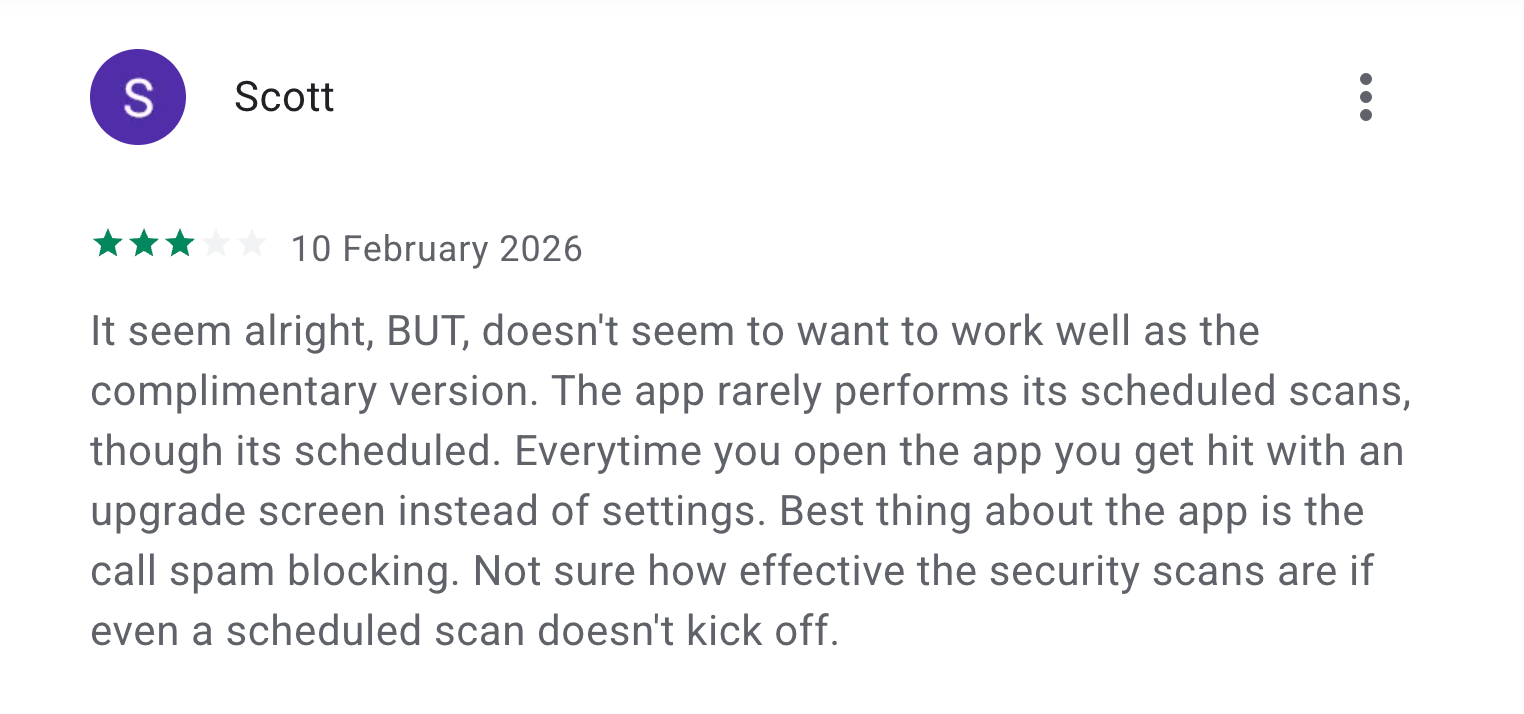
Source: Play Store
There are also complaints about some of the included add-ons. Some people who have used the Call Filter app report that it may not be very effective at spam filtering, occasionally blocking known contacts while letting spam go through.
A common pattern is that features exist, but they don’t always work reliably. This highlights valid reliability concerns for a service positioned primarily around security.
Verdict: Is Verizon Digital Secure Worth It?
Short answer: no. Digital Secure is not the “all-in-one” solution Verizon claims it to be. It’s just one component of the carrier’s upsell-heavy ecosystem.
Key protections are split across multiple add-ons, meaning real coverage often requires stacking subscriptions. Even then, user experiences raise serious doubts about whether the core features even work as advertised.
However, the biggest issue is the systemic risk posed by the carrier's data-hungry model.
For years, Verizon and other major U.S. telecom providers have been collecting, exposing, and selling user data to third parties. Many of them still rely on weak, outdated protocols like SS7 for routing your calls and texts, so major breaches are common.
Verizon itself suffered an internal data breach in early 2023, exposing sensitive details of over 63,000 of its employees. Paying for a security add-on doesn't change any of that; it just gives Verizon access to even more of your data.
If limiting data collection and reducing network-level exposure are priorities, switch to a privacy-native alternative like Cape.
Cape: The Carrier Built for Security and Privacy
Cape is a privacy-first mobile carrier designed to keep your communications safe from surveillance and misuse. Unlike traditional cell phone plan providers, our business model centers around providing you with premium and secure call, text, and data, rather than harvesting and selling your information.
Our service is built from the ground up with privacy and security at its core, offering unique features like:
Privacy & Security Feature | Description |
Cape doesn’t ask for your name, address, or Social Security number. We only collect the information necessary to provide service, and we retain that information for the minimum amount of time possible. | |
Traditional carriers rely on a fixed International Mobile Subscriber ID (IMSI) to connect your device to cellular networks. This is a vulnerability that lets carriers, advertisers, and bad actors identify and track your device. Cape lets subscribers automatically rotate their IMSI every 24 hours, making it infinitely more difficult to track you or your device. | |
Many services ask for your phone number, but sharing it exposes you to spam, scammers, data brokers, and a variety of other risks. VoIPs, on the other hand, don’t work with 2FA, cost extra, and aren’t encrypted. With Cape, you get two free additional SMS/MMS lines that are middle-to-end encrypted. | |
One-time passwords (OTP) can be intercepted by bad actors if SMS messages aren’t encrypted, exposing your bank accounts and other sensitive data. With Cape, you can encrypt and route all SMS/MMS messages through the Cape app, so even if they’re intercepted, nobody can read them. This feature is currently only available on iPhone. Android coming soon. | |
Cape nullifies the threat of SIM swapping by completely removing humans from the loop. During signup, you receive a 24-word phrase that generates a private key tied to your number. This effectively means that no one (but you) can move your number to a new carrier or device, not even Cape. | |
Legacy network protocols, like SS7, leave you vulnerable to hackers that can track your location, intercept your calls and texts, and steal sensitive information. Cape’s Network Lock relies on a proprietary signaling proxy to verify that your device’s physical location matches the network it’s trying to attach to. If we detect anything out of the ordinary, Cape automatically blocks the connection, nullifying the potential threat. | |
Traditional voicemail systems are outdated, unencrypted, and another security hole bad actors can exploit to gain access to your sensitive information. Cape encrypts all voicemails, ensuring only you can access them. | |
While roaming, your phone connects to local telecom providers to enable service. But, who knows who might be listening on the other end. Cape provides you with peace of mind by routing your traffic through our U.S.-based mobile core, ensuring your identity, data, and communications remain private and secure. |
Ditch Legacy Carriers: Get Cape Today
Cape is a “Heavy” Mobile Virtual Network Operator (MVNO), meaning we own our mobile core and provision our own SIMs. This gives us full control over how accounts are authenticated and what data is collected (and for how long), and is how we are able to provide privacy and security features no other carrier on the market can offer.
Get started with Cape today and enjoy the peace of mind, knowing you are fully protected against scammers, hackers, bad actors, and other mobile threats.
To help protect more than just your phone, we’ve partnered with Proton. As a new Cape subscriber, you can choose between Proton Unlimited and Proton VPN Plus for just $1 for six months.
Share it