Verizon's Call Filter app promises to block spam and robocalls automatically using network-level filtering and caller authentication.
However, like any other carrier-level filtering service, it misses many spam calls, occasionally blocks legitimate calls, and doesn't address the root problem of how your number ends up in scammer databases in the first place.
This review walks you through what Verizon’s call blocking feature actually does, where it fails, and what a better security and privacy solution looks like.
How Does Verizon Call Filter Work?
Verizon Call Filter uses caller authentication standards and a network-level scoring system to decide whether incoming calls are legitimate or spam.
When a call gets to your number, Verizon checks it against internal reputational databases, third-party spam lists, and community feedback from other users who have reported the number.
Call Filter also uses the STIR/SHAKEN framework, a core telecom standard used by many major U.S. carriers to combat spoofing. STIR/SHAKEN attaches a digital signature to calls that’s used to verify whether the caller's number is legitimate.
Based on all these inputs, Verizon assigns a risk level to each incoming call. Calls considered high-risk may be blocked or automatically sent to voicemail based on your settings. Call Filter can also block caller ID on your Verizon number based on the category it falls under, such as telemarketing, survey, political, or nonprofit calls.
However, the tool’s effectiveness depends heavily on known spam reports and historical patterns. Newer spam campaigns, freshly spoofed numbers, and unsupported or unlisted numbers can still pass through. Verizon itself notes that it doesn’t guarantee all spam calls will be detected.
Verizon Call Filter Free vs. Paid Features
Verizon Call Filter operates on a freemium model. The free version includes basic spam identification and blocking tools. However, many of the useful features are reserved for the paid plan. Here’s the pricing breakdown of each plan:
- Call Filter (Free): Included with eligible standard monthly and prepaid plans
- Call Filter Plus: $3.99 per month per line; $10.99 per month for three or more lines
The following table shows what each tier includes:
Feature | What It Does | Call Filter (Free) | Call Filter Plus |
Spam detection and blocking | Identifies and blocks numbers likely to be spam or scam | ✅ | ✅ |
Reporting | Lets you report numbers as spam to improve future detection | ✅ | ✅ |
Neighborhood filter | Blocks calls from specific area codes or prefixes except your contacts | ✅ | ✅ |
Caller ID | Shows caller name and related information on incoming calls | ❌ | ✅ |
Personal block lists | Lets you manually add specific phone numbers to a custom block list | ❌ | ✅ |
Block by category | Filters calls by type (e.g., telemarketer or survey) | ❌ | ✅ |
Spam risk meter | Shows how likely an incoming call is spam | ❌ | ✅ |
Spam number lookup | Lets you check an unknown number against Verizon’s spam database | ❌ | ✅ |
Considering many of the premium features, such as caller ID and category blocking, rely on the same fundamental data and classifications that the system uses to flag calls, the distinction between free and paid features appears to be an artificial restriction rather than a technical limitation.
At the same time, tools like custom block lists require you to manually identify and block numbers, which is only useful if the same person repeatedly calls you. That’s rarely the case in practice because spammers constantly spoof or change numbers, so such features don’t significantly reduce spam volume, even with the paid upgrade.
Verizon Call Filter User Reviews
User feedback reveals a stark gap between what Call Filter promises and what it delivers in practice.
Customers who’ve tried the app generally agree that Verizon’s call filtering is better than nothing for basic spam tagging and blocking. However, reviews show a consistent pattern of limited effectiveness and questionable value.
Many spam calls and texts still come through even after installing the app, forcing you to manually flag numbers instead. Users have noted that this is completely ineffective since spammers constantly rotate numbers.
There are also complaints about false positives. Legitimate calls from important contacts are being blocked. On top of that, several reviews reinforce the idea that meaningful blocking features aren’t available in the basic plan, forcing you to either tolerate spam or upgrade.
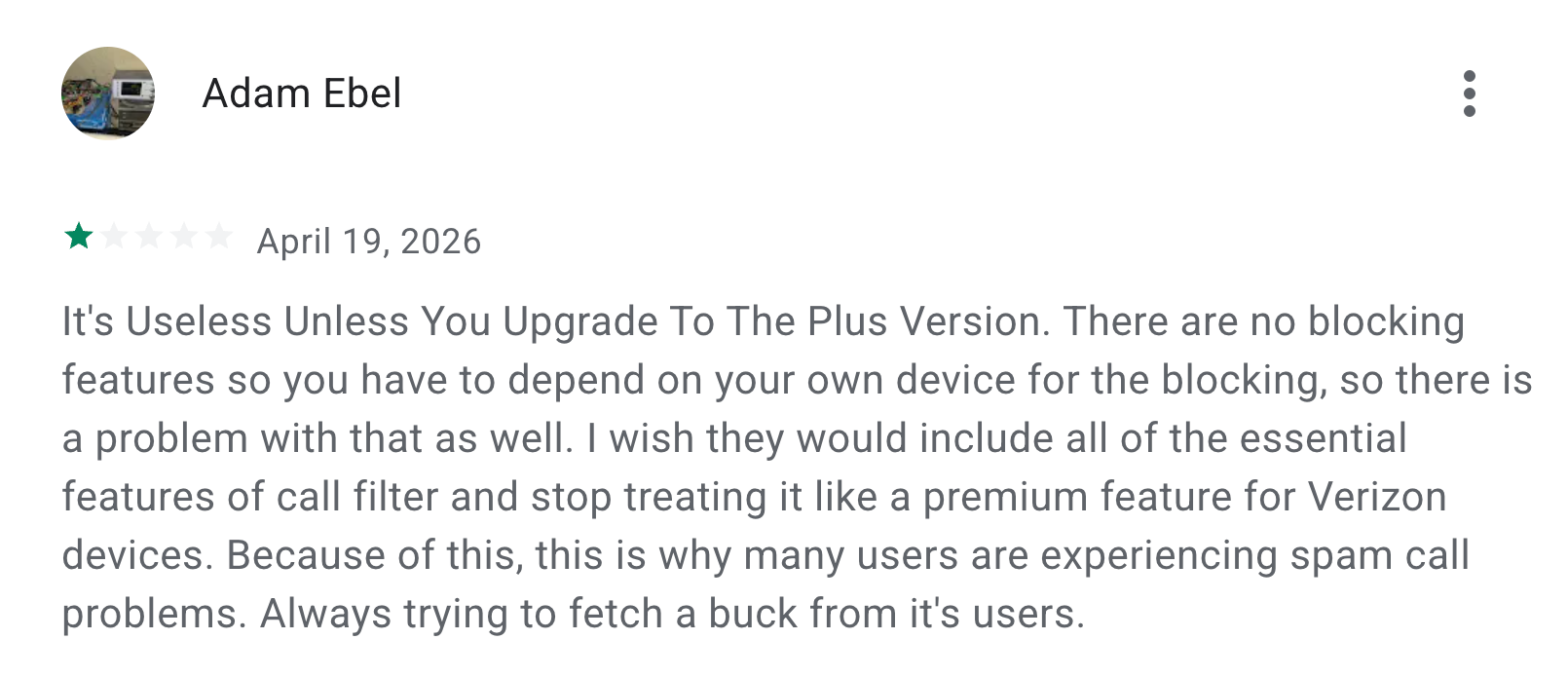
Source: Play Store
Overall, the feedback suggests that Verizon’s call blocking app doesn’t reliably solve the problem it’s meant to address.
Security Concerns With Verizon Call Filter
Beyond effectiveness and usability, Verizon’s track record raises questions about whether its app is actually safe to use.
For example, in early 2025, cybersecurity expert Evan Connelly found a bug in Verizon's Call Filter iOS app that allowed anyone to access the call logs of millions of subscribers. The flaw exposed phone numbers and timestamps without proper ownership verification, highlighting a critical breakdown in the carrier’s basic security and access control systems.
At the same time, using Call Filter requires you to grant the app access to call logs, contacts, and related metadata. That information is then processed across Verizon’s systems, increasing the number of touchpoints where sensitive information is stored or accessible. A single breach or security flaw can expose that data to:
- Hackers
- Scammers
- Other unauthorized parties
These risks are amplified by Verizon’s broader model, which depends on retaining large volumes of user data and participating in data-sharing ecosystems tied to analytics and advertising. Taken together, these factors create exposure that call blocking alone doesn’t address.
Privacy-first carriers like Cape take a different approach. Rather than adding security layers on top of a broken system, Cape minimizes what’s collected and how long it’s retained in the first place. We only collect the minimum amount of data required to provide service, and all Call Data Records (CDRs) are deleted after just 24 hours.
Other Effective Ways To Block Spam Calls
Verizon’s Call Filter has clear limitations, so relying on it alone isn’t enough. To cover the gaps, here are a few alternative methods.
- Use third-party call blocking apps
- Sign up for the “Do Not Call” registry
- Enable DND mode and whitelist your contacts
1. Use Third-Party Call Blocking Apps
Many third-party apps, such as RoboKiller, Hiya, and Truecaller, help you identify robocall patterns and intercept calls, similar to Verizon’s call-blocking feature. They often use larger, global crowdsourced databases and offer additional quality-of-life features that make them superior to basic carrier-provided apps.
Here’s a quick feature comparison of some of the most popular ones:
Aspect | Verizon Call Filter | Hiya | RoboKiller | Truecaller |
Key features | Network analytics, community reports | Global spam database, expansive algorithms | Audio fingerprinting, AI-driven answer bots | Massive global caller ID database |
Free plan available? | Yes (spam detection and filter) | Yes (spam detection, unlimited lookups) | No (7-day trial) | Yes (basic caller ID & block) |
Paid pricing (per line) | $3.99 | $3.99 | Starts at $4.99 | $9.99 |
Drawbacks | Limited to Verizon's network; can block legitimate calls | May collect call data for its database | No free tier | Can be ad-heavy on free tier; privacy concerns |
2. Sign Up for the “Do Not Call” Registry
The National Do Not Call Registry, run by the FTC, instructs companies and telemarketers to remove your number from their call lists. You can register your mobile number for free at DoNotCall.gov or by calling 1-888-382-1222.
It’s a simple step that works alongside technical tools like Verizon's Call Filter. However, this method only works with companies that follow the law. Most scammers don’t follow telemarketing laws and won’t care if your number is on the Do Not Call registry.
So while signing up can reduce some legitimate telemarketing, it won’t stop unlawful spam calls on its own. The registry also doesn't apply to political calls, charities, surveys, or businesses with which you have an existing relationship.
3. Enable DND Mode and Whitelist Your Contacts
Do Not Disturb (DND) or Focus Mode on smartphones lets you silence all calls except those from specific contacts. It doesn’t block calls; your phone still receives them, but it won’t ring or alert you unless the caller is on your allow list.
This step is a bit more extreme and works best when you only want calls from known contacts (e.g., family or work). It’s not ideal if you need to receive occasional unknown but legitimate calls (from delivery services or medical offices), but it guarantees silence from all other numbers.
Here are the steps to enable DND on iPhone:
- Go to Settings > Focus > Do Not Disturb
- Under Allowed Notifications, choose People > Calls From Favorites (or specific groups)
- All other calls will be silenced
On Android, you can follow these steps:
- Open Settings > Sound & vibration > Do Not Disturb
- Tap People > Calls from > Your Contacts or Starred contacts
- Activate Do Not Disturb
Why Call Blocking Alone Isn’t Enough for Privacy Protection
Call blocking is effective in managing incoming spam and protecting against phishing scams. But many people ignore a fundamental question: how did the scammer get your number in the first place?
Turns out that the very network promising to protect you against scams also collects and shares your most sensitive data: call records, location history, and SMS content.
Major telecom companies like Verizon, AT&T, and Mint Mobile keep detailed records of your communications and metadata as part of their normal operations. Their internal systems and third-party partnerships become high-value targets, and security failures at this level render any call filter useless.
That’s where Cape’s privacy-first mobile architecture comes in. It minimizes the amount of data collected and retained, reducing what can be logged, shared, or breached.
Meet Cape: The Secure Carrier Designed for Today’s Threats
We share the most intimate details of our everyday lives with our cell phones. In order to stay connected, our cell phones share that information with local cell networks, and in turn, those cell networks share our data with each other.
While this system is what makes connectivity possible, it was also built with interoperability as its priority, rather than security. The global cell network is vulnerable to a number of threats, as seen through headlines about major carrier data breaches we see time and time again. When major carriers aren’t losing our sensitive personal data in breaches and hacks, they’re actively selling it to ad networks, data brokers, and third parties.
At Cape, we believe that privacy and security shouldn’t have to be sacrificed for connectivity. That’s why we built our service with privacy principles and security features at its core, including:
Cape eliminates the risk of your sensitive data falling into the wrong hands by not even asking for it. When you make your Cape account, we don’t ask for your name, address, or SSN. We only collect the information that’s necessary to provide the service, and we retain it for the least amount of time possible.
During account creation, you receive a unique 24-word phrase that generates a private key tied to your phone number. This pass phrase is required to move your number to a new device or carrier. Nobody else, not even us at Cape, has access to the phrase, meaning there’s absolutely no way for bad actors to transfer your number to their device, effectively nullifying the possibility of SIM swapping.
Your phone stores an incredible amount of data, which can be accessed through call and text records. Most mobile carriers store your call and text metadata for years, which can easily fall into the wrong hands.
Cape is built to forget, meaning we delete Call Data Records (CDRs) after just 1 day, ensuring nobody can see who you texted or called, track where the communication took place, or access the sensitive information within CDRs.
All SIM cards are accompanied by International Mobile Subscriber IDs (IMSI). These function as unique identifiers devices use to register with cellular networks. Traditional telcos assign fixed IMSIs to user accounts, meaning the carriers, advertisers, hackers, and other bad actors can exploit them to identify and track your device.
Cape patches this security hole by allowing you to automatically rotate your IMSI every 24 hours. In practice, this means you appear as a different subscriber every day, making it much more difficult for anyone to identify your device or track your movements.
Are you tired of spam messages from brands, phone call surveys, and scammers trying to trick you into sharing sensitive information over the phone? The reason why most people are exposed to these nuisances is that we are often required to share our phone numbers with retailers, websites, apps, and service providers.
While messages and phone calls can be annoying, what’s worse is that your number can easily become a target for data brokers and bad actors. That’s why many people turn to VoIP numbers as secondary lines. VoIPs are a decent option, but they don’t fully solve the issue—they are not encrypted, you can’t use them for 2FA, and they’re an additional cost each month.
When you sign up for Cape, you get two free additional SMS/MMS lines that are middle-to-end encrypted. This allows you to use Secondary Numbers for online shopping, signing up for services and discounts, and receiving secure OTPs, while your primary phone number is reserved for friends and family.
6. Network Lock
Traditional cellular networks were designed for interoperability, not security. Outdated and legacy network protocols like SS7 have vulnerabilities that allow attackers to hack in and track your location, intercept your calls and texts, and steal sensitive information.
Cape’s Network Lock uses a proprietary signaling proxy to verify that your device’s physical location matches the network it’s trying to attach to. If anything looks suspicious, like a mismatched location, we block the connection.
Voicemails can reveal more than you think, from personal messages to authentication codes, yet most voicemail systems are outdated and unencrypted.
Cape encrypts your voicemails so that only you can access them.
To access phone service while traveling abroad, your phone typically needs to connect to local telecom providers. The trouble is, there’s no guarantee all networks are secure, and not every government treats privacy the same.
Cape doesn’t leave anything to chance. We let you route traffic through our U.S.-based mobile core, so you can safely use international data roaming without exposing your identity or sharing sensitive data or communications with foreign carriers.
With Cape, you get up to 15 GB per month of international roaming, included in your monthly plan.
Get Started With Cape Today
If you’re ready to make a switch from legacy telcos to America's privacy-first mobile carrier, visit cape.co/get-cape.
In addition to all the features listed above, you can further enhance your privacy and security with Proton. Our partnership with this technology leader allows you to get Proton Unlimited or Proton VPN Plus for only $1 for the first six months.
Share it