With phone-based scams on the rise, more U.S. carriers are seeing the need to integrate protection tools into their cellular offerings. AT&T’s ActiveArmor is one of these solutions, promising to protect its users from common digital threats through several network and web security tools.
In practice, user feedback indicates inconsistent filtering, false positives, and features that work only partially or require manual intervention. Others have run into usability issues, including login failures and frequent error messages.
This AT&T ActiveArmor review evaluates what features it offers, how well it performs in practice, and what it doesn’t protect you from. More notably, we’ll discuss a significant privacy limitation of the service and provide solutions to address it.
What Is AT&T ActiveArmor?
AT&T ActiveArmor is a freemium security add-on available to all AT&T Wireless, Prepaid, and Fiber subscribers that claims to protect you from spam, fraud, identity theft, and other online threats.
The free version focuses on basic protection such as spam call filtering, device scanning, and breach alerts. You can also get a paid upgrade called ActiveArmor Advanced that includes additional features like:
- A virtual private network (VPN)
- Safe browsing features
- Caller ID and reverse number lookup
- A password manager
- Identity monitoring and restoration support
For its fiber internet customers, AT&T provides the ActiveArmor internet security suite that can be managed through the Smart Home Manager app. The free version protects all devices on your home network by scanning all network traffic and notifying you of known threats. The paid tier adds features like a VPN, identity monitoring, and advanced content filtering.
How Does AT&T ActiveArmor Work?
AT&T ActiveArmor works by combining network-based filtering and app-level controls to stop scam calls, spam messages, and other suspicious activity before it reaches you.
When you get a call or SMS, AT&T's network analyzes it against a large database of known fraudulent and spam numbers. If it identifies it as “Spam Risk,” it is either blocked or sent to voicemail, depending on your preferences. When available, you may see calls labeled by category, such as:
- Telemarketers
- Surveys
- Nonprofit
- Robocalls
- Political
For on-device protection, the ActiveArmor app scans your devices for malware and outdated software. It also pulls real-time intelligence data from AT&T servers to notify you of data breaches and other security warnings.
However, some users have reported that the app runs heavily in the background, leading to noticeable battery drain or increased device activity over time. While disabling background app refresh can help reduce battery impact, the performance issues suggest that the app is not optimized for minimal resource consumption.
ActiveArmor for Fiber users offers similar protection for wired and Wi-Fi devices. It scans all incoming and outgoing traffic at the gateway level and automatically blocks unsafe IPs/domains, malware, or phishing websites using real-time behavioral analysis and threat signatures.
How Much Does AT&T ActiveArmor Cost?
AT&T ActiveArmor has a free plan, but its scope is relatively limited. Core features like spam call blocking and breach alerts are included, but many protections you typically associate with comprehensive mobile security are only available in the paid tier.
ActiveArmor Advanced mobile security costs $3.99 per month, and the charge is added to your monthly cellular bill. The premium plan is also included at no additional cost with the following wireless plans:
- AT&T Unlimited Extra EL
- AT&T Unlimited Premium PL
In practice, users looking for broader protection may find the free version insufficient on its own, requiring an upgrade to access features that address a wider range of threats.
The price for AT&T ActiveArmor Advanced internet security is $7 per month for Fiber users, but it’s also included with internet plans at 2 Gbps or higher.
ActiveArmor Reviews, Limitations, and Common Complaints
User reviews for ActiveArmor from public platforms and forums are mixed. The most frequent complaints revolve around inconsistent spam filtering and privacy concerns. For example, some spam or unwanted calls can still get through despite filters and strict settings, while calls from legitimate contacts often get blocked.
User reviews for ActiveArmor from public platforms and forums are mixed. The most frequent complaints revolve around inconsistent spam filtering and privacy concerns. For example, some spam or unwanted calls can still get through despite filters and strict settings, while calls from legitimate contacts often get blocked.
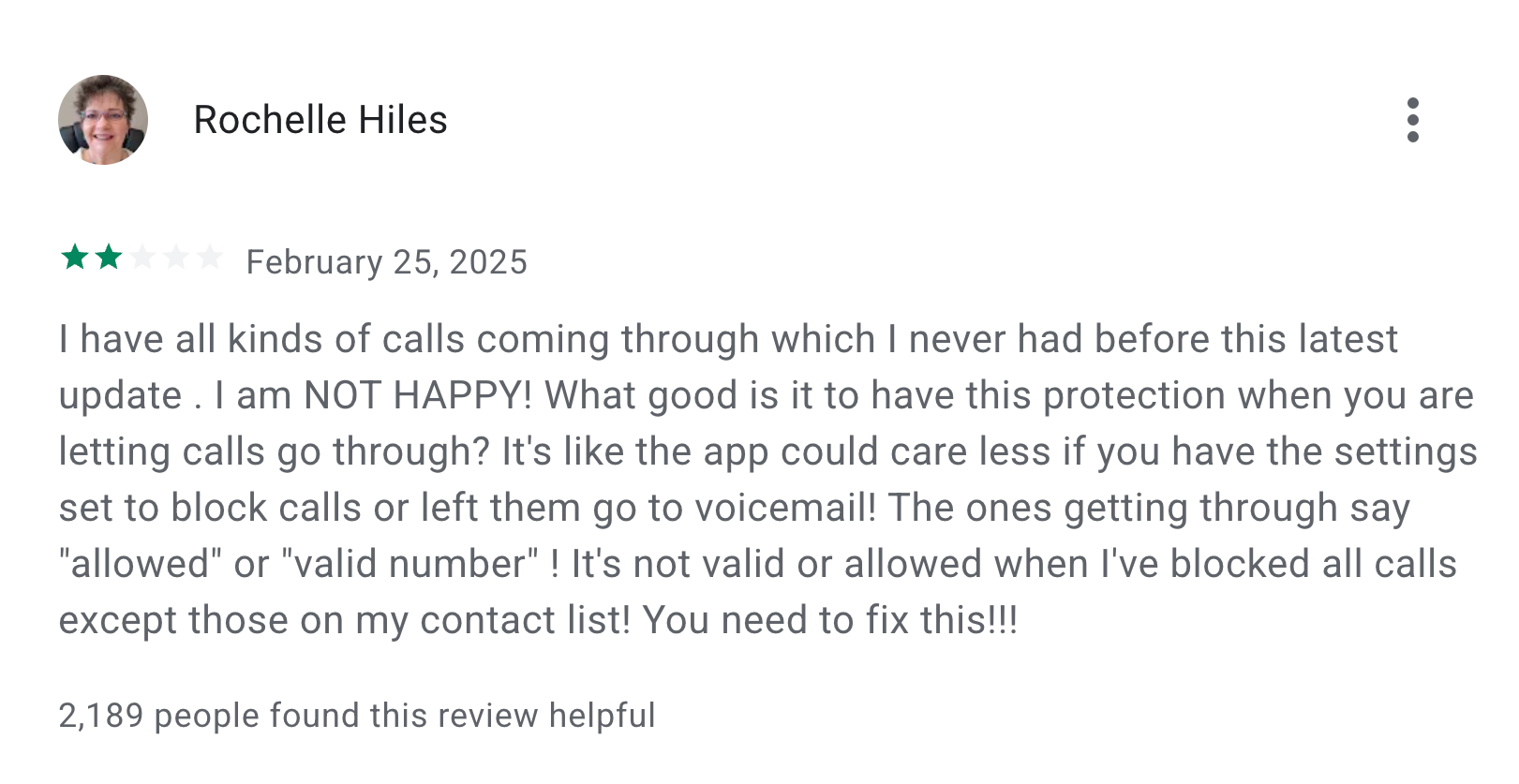
Source: Play Store
There are also issues concerning control and usability. One person even called the app “spyware” after they were unable to remove the app from their phone. Some AT&T Fiber users report significant speed drops when ActiveArmor is enabled, with connections returning to normal after turning it off.
Finally, some users express frustration with receiving prompts or emails from AT&T promoting ActiveArmor, suggesting the carrier might be actively pushing the add-on.
Is ActiveArmor Safe To Use?
AT&T ActiveArmor is generally safe from a technical standpoint, as it won’t harm or compromise your device on its own. However, it comes with inherent privacy trade-offs you should be aware of.
Traffic and metadata that ActiveArmor scans for security are handled under AT&T’s overarching privacy policy. According to independent privacy evaluations, some aspects of AT&T’s broader privacy practices have been flagged for sharing or using personal data for marketing and profiling purposes, which can feel intrusive to some users.
ActiveArmor is an add-on; it doesn’t change AT&T's core network architecture or data handling policies. Additionally, ActiveArmor also can’t protect you from threats that exploit social engineering tactics and bypass technical defenses, such as account takeovers or SIM swap scams that exploit carrier-facilitated processes.
How To Remove AT&T ActiveArmor
If you decide you no longer want to use ActiveArmor, you need to cancel the service through the mobile app, as deleting it alone won’t stop billing or fully deactivate the service.
Here’s how to turn off AT&T ActiveArmor on your iOS or Android phone:
- Open the ActiveArmor app
- Go to Settings > Subscription
- Tap Remove service and follow the instructions
- Once deactivated, you can delete the app from your phone
If you’re using the ActiveArmor internet security, you can turn off the add-on using the Smart Home Manager app or your AT&T account.
ActiveArmor vs. Other Carrier-Based Security Tools
ActiveArmor isn’t the only mobile security software available. Most major carriers offer similar add-ons designed to block spam calls, filter suspicious links, and provide basic threat alerts.
For example, Verizon offers spam blocking through its Call Filter app, while T-Mobile includes Scam Shield with its cellular plans.
In practice, these tools face many of the same limitations as ActiveArmor. Users across different carriers report familiar issues, including:
- Spam calls still getting through
- Legitimate calls being flagged incorrectly
- Inconsistent performance depending on device or network conditions
That’s largely because these services rely primarily on automated filtering and app-based monitoring. While these methods can reduce some nuisance calls, they aren’t always reliable.
More importantly, using any carrier-based security tool means granting your carrier deeper access to monitor your network traffic, device activity, and communications data. You're asking them to surveil you for your own protection, but that surveillance data becomes part of their broader data ecosystem, available for profiling, targeting, and potential misuse.
Is ActiveArmor the Best Option for You?
ActiveArmor can be useful if you are an AT&T subscriber who wants integrated spam filtering and basic threat alerts without buying separate security apps. It works right with your wireless or Fiber service and doesn’t require extra setup.
However, the service isn’t recommended for privacy-conscious users. AT&T's revenue depends on subscriber fees and data-driven advertising and brokerage. ActiveArmor is trying to protect you from incoming spam while feeding the very sources it originates from. It’s an inherent conflict.
AT&T's own history of data breaches and settlements underscores why this matters. The carrier recently agreed to a $177 million class-action settlement after two major data breaches exposed millions of customer records, illustrating ongoing risks associated with how large carriers handle sensitive data.
Security add-ons can’t fix a foundation built on data harvesting. This creates a permanent trust deficit. If you’re prioritizing privacy, the solution is to minimize trust in your carrier itself and choose a privacy-first mobile carrier like Cape.
Meet Cape: The Secure Carrier Designed for Today’s Threats
We share the most intimate details of our everyday lives with our cell phones. In order to stay connected, our cell phones share that information with local cell networks, and in turn, those cell networks share our data with each other.
While this system is what makes connectivity possible, it was also built with interoperability as its priority, rather than security. The global cell network is vulnerable to a number of threats, as seen through headlines about major carrier data breaches we see time and time again. When major carriers aren’t losing our sensitive personal data in breaches and hacks, they’re actively selling it to ad networks, data brokers, and third parties.
At Cape, we believe that privacy and security shouldn’t have to be sacrificed for connectivity. That’s why we built our service with privacy principles and security features at its core, including:
Cape eliminates the risk of your sensitive data falling into the wrong hands by not even asking for it. When you make your Cape account, we don’t ask for your name, address, or SSN. We only collect the information that’s necessary to provide the service, and we retain it for the least amount of time possible.
During account creation, you receive a unique 24-word phrase that generates a private key tied to your phone number. This pass phrase is required to move your number to a new device or carrier. Nobody else, not even us at Cape, has access to the phrase, meaning there’s absolutely no way for bad actors to transfer your number to their device, effectively nullifying the possibility of SIM swapping.
Your phone stores an incredible amount of data, which can be accessed through call and text records. Most mobile carriers store your call and text metadata for years, which can easily fall into the wrong hands.
Cape is built to forget, meaning we delete Call Data Records (CDRs) after just 1 day, ensuring nobody can see who you texted or called, track where the communication took place, or access the sensitive information within CDRs.
All SIM cards are accompanied by International Mobile Subscriber IDs (IMSI). These function as unique identifiers devices use to register with cellular networks. Traditional telcos assign fixed IMSIs to user accounts, meaning the carriers, advertisers, hackers, and other bad actors can exploit them to identify and track your device.
Cape patches this security hole by allowing you to automatically rotate your IMSI every 24 hours. In practice, this means you appear as a different subscriber every day, making it much more difficult for anyone to identify your device or track your movements.
Are you tired of spam messages from brands, phone call surveys, and scammers trying to trick you into sharing sensitive information over the phone? The reason why most people are exposed to these nuisances is that we are often required to share our phone numbers with retailers, websites, apps, and service providers.
While messages and phone calls can be annoying, what’s worse is that your number can easily become a target for data brokers and bad actors. That’s why many people turn to VoIP numbers as secondary lines. VoIPs are a decent option, but they don’t fully solve the issue—they are not encrypted, you can’t use them for 2FA, and they’re an additional cost each month.
When you sign up for Cape, you get two free additional SMS/MMS lines that are middle-to-end encrypted. This allows you to use Secondary Numbers for online shopping, signing up for services and discounts, and receiving secure OTPs, while your primary phone number is reserved for friends and family.
6. Network Lock
Traditional cellular networks were designed for interoperability, not security. Outdated and legacy network protocols like SS7 have vulnerabilities that allow attackers to hack in and track your location, intercept your calls and texts, and steal sensitive information.
Cape’s Network Lock uses a proprietary signaling proxy to verify that your device’s physical location matches the network it’s trying to attach to. If anything looks suspicious, like a mismatched location, we block the connection.
Voicemails can reveal more than you think, from personal messages to authentication codes, yet most voicemail systems are outdated and unencrypted.
Cape encrypts your voicemails so that only you can access them.
To access phone service while traveling abroad, your phone typically needs to connect to local telecom providers. The trouble is, there’s no guarantee all networks are secure, and not every government treats privacy the same.
Cape doesn’t leave anything to chance. We let you route traffic through our U.S.-based mobile core, so you can safely use international data roaming without exposing your identity or sharing sensitive data or communications with foreign carriers.
With Cape, you get up to 15 GB per month of international roaming, included in your monthly plan.
Get Started With Cape Today
If you’re ready to make a switch from legacy telcos to America's privacy-first mobile carrier, visit cape.co/get-cape.
In addition to all the features listed above, you can further enhance your privacy and security with Proton. Our partnership with this technology leader allows you to get Proton Unlimited or Proton VPN Plus for only $1 for the first six months.
Share it